via @nixcraft




soffice --infilter="writer_pdf_import" --convert-to doc file.pdf
soffice --infilter="writer_pdf_import" --convert-to docx file.pdf
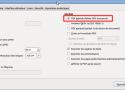
Dans LibreOffice, quand vous exportez un PDF, vous avez la possibilité d'inclure le document LibreOffice original DANS le PDF.
L'avantage ?
Tout le monde peut lire le document (c'est un PDF), mais vous pouvez aussi le ré-ouvrir dans LibreOffice pour l'éditer !
Pratique également pour archiver des documents à long terme: Pas besoin d'avoir 2 fichiers.
Lors de l'export PDF, cochez juste la case « PDF hybride (fichier ODF incorporé) »

convertisseur de pdf en epub
The (by far) most visited post on this blog is from 2010, about OCRing a PDF in GNU/Linux (Optical Character Recognition), and it contains a small shell script that has been improved by others several times. After having bought a new flatbed scanner, I re-investigated how to scan and OCR pdfs, how to produce DJVU files that are incredibly small and how to get metadata right. It turns out what I really ever wanted was to create PDF/A compliant documents (I just didn't know what PDF/A was before). But let me explain the details after presenting you the quick solution. At the end, I have a shell script that scans directly to PDF/A.